

Seller Essentials
Resources for Amazon sellers, and wherever you sell next
Find a prep center, compare seller tools, and keep up with Amazon fee and policy changes. Everything here is written by people who sell, and we now cover Walmart and other marketplaces too.
On this page
Seller Central User Permissions: How to Give a VA Access Safely
Seller Central user permissions decide what a VA can see and change in your Amazon account. Start every permission at None, add access one task at a time, and remove it the day the work ends.
More recent posts
Amazon Prep Center Seller Central Access: What Manage Services Grants
FBA Prep Services · November 2026
Amazon Prep Center Seller Central Access: What Manage Services Grants
Prep centers connect through Manage Services. Check the authorization screen and ask the prep center five questions before you approve.
When you hire a prep center, it needs some access to your Seller Central account to work on your shipments. Amazon treats a prep center as an outside business, so the access goes through Manage Services, not through an employee invite. You choose what to allow and which account and countries it applies to. The access ends on a date shown on the screen. The steps below follow that screen. If you are still choosing a prep center, start with our Amazon FBA prep services directory.
Key Takeaways
- A prep center is an outside business, so you authorize it as a service provider in Manage Services instead of inviting it as an employee.
- You must be the account owner or an administrator, and the prep center must be registered in Amazon’s Solution Provider Portal with approved roles.
- You choose the permissions and can limit the countries. The access lasts 365 days.
- You can view or remove access from Manage Services at any time, and you can reauthorize before it expires.
Prep Centers Connect Through Manage Services
Amazon’s help page defines a service provider as any third party outside your organization that you grant access to your Seller Central account. A prep center fits that description. An employee is someone inside your organization, and employees are managed in Manage Employees instead of Manage Services.
Two things have to be true before you can authorize a prep center. You must be the account owner or an account administrator. The prep center must also be registered in Amazon’s Solution Provider Portal and have approved roles.
How to Authorize a Prep Center, Step by Step
There are two ways to start. The prep center can send you its authorization link, or you can open its listing in the Service Provider Network and choose Authorize Now. If the prep center is listed in the network, Amazon creates a service request when you confirm, and the prep center must accept it before the authorization becomes active.
- Open the authorization link or choose Authorize Now.
- Review the permissions on the screen. Each one starts at None.
- Use the country and region dropdown if you want to limit where the access applies.
- Tick the confirmation box. It says you direct Amazon to give the provider access to your account and related data, and that you are responsible for any actions the provider takes.
- Choose Authorize.
The screen also shows an expiration date, and access lasts 365 days.

Prep Center Permissions: What the Screen Shows
The permissions you see depend on the roles the prep center is approved for. Amazon says only the roles a provider has been approved for appear on the authorization page.
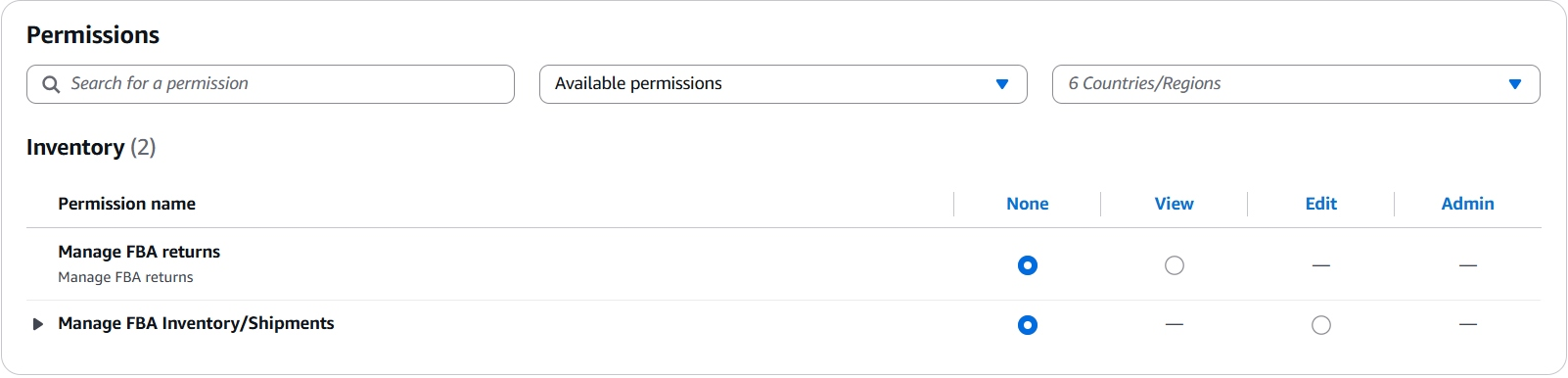
On the screens we checked, one prep center showed two permissions under Inventory:
- Manage FBA returns: None or View.
- Manage FBA Inventory/Shipments: None or Edit.
The other prep centers we checked showed only Manage FBA Inventory/Shipments. Each permission offers only the levels that apply, so Manage FBA Inventory/Shipments has no View setting and Manage FBA returns has no Edit setting. If returns is missing for your prep center, it may not be approved for that role, or it may not offer that service.
The arrow beside Manage FBA Inventory/Shipments opens a list of your own selling accounts and the countries you are authorized to sell in. Use it to match the access to the account and marketplace the prep center will work on.
Prep Center Shipping Costs: Whose Account Pays
In most cases, the prep center buys shipping from inside your seller account through Amazon’s Partnered Carrier program, and the charge is billed to your account. Amazon says the program offers discounted rates for sending shipments to FBA fulfillment centers. Larger prep centers may have negotiated rates that are better still, so ask what they can offer and compare it with the partnered rate.
Questions to Ask Before You Authorize a Prep Center
- Which Seller Central roles are you approved for?
- Do you offer returns handling?
- Do you buy shipping through my account, or on your own rates?
- What happens if Amazon rejects or delays a shipment because of a prep error?
- Who on your team will be working in my account?
Our guide to choosing an Amazon FBA prep center lists six things to compare before you commit.
If Your Prep Center Sends Different Instructions
Some prep centers publish setup guides that ask you to invite them as a user and set permissions such as Manage FBA Inventory/Shipments. That is the employee route, which Amazon’s help page describes as access for people inside your organization. The steps and screen names in those guides may not match what you see in Manage Services. If a prep center sends you one, ask whether it also offers the Manage Services authorization.
Reauthorize or Remove Prep Center Access
You can view or remove a provider’s access at any time from the Manage Services page. Before the 365 days end, you can reauthorize to avoid an interruption. If the authorization expires, the provider can no longer act on your account, and you must complete the full authorization process again. Amazon says removal cannot be undone, so restoring access means authorizing the provider again.
Put the expiry date on your calendar, and review who has access whenever you change prep centers.
Frequently Asked Questions About Prep Center Seller Central Access
How do I give a prep center access to my Amazon Seller Central account?
Authorize it through Manage Services. Amazon describes an outside business as a service provider, and you start with the authorization link the prep center sends you or with Authorize Now on its Service Provider Network listing.
Should I add a prep center as an employee or a service provider in Seller Central?
A prep center is an outside business, and Amazon’s help page says anyone outside your organization uses Service Provider access, which you manage in Manage Services. An employee is someone inside your organization.
Why doesn’t my prep center’s Seller Central authorization show FBA returns?
The permissions shown are the roles that prep center is approved for. Ask the prep center whether it offers returns handling.
Can I limit a prep center’s Seller Central access to one account or marketplace?
Yes. The authorization screen has a country and region filter, and the arrow beside Manage FBA Inventory/Shipments lets you choose which of your selling accounts the access applies to.
How long does a prep center’s Seller Central authorization last?
It lasts 365 days. The expiration date appears on the authorization screen, and you can reauthorize before it ends.
How do I remove a prep center’s access to my Amazon Seller Central account?
Open Manage Services and remove the provider at any time. Removal cannot be undone, so you would need to authorize the provider again to restore access.
FBA Prep Services Directory
Find and compare Amazon FBA prep centers
Authorizing a prep center is the step that comes after you choose one. The Seller Essentials directory lists prep centers by model and location, including online arbitrage, wholesale, import and tax-free options, so you can compare providers before you give anyone access.

Walmart Is Tracking Return Rate by Item: What Sellers Should Do Now
Walmart Seller News · November 2026
Walmart Is Tracking Return Rate by Item: What Sellers Should Do Now
Walmart now tracks Return Rate for each item, and from January 2027 a high-return item can be warned or temporarily unpublished even when your account rate is fine. Here is how to check your items.
Walmart updated its Return Rate guide and posted a release note on November 6, 2026. Return Rate was already a Seller Performance Standard, measured across your whole account. Walmart now also monitors it for each item. Beginning in January 2027, an item with a high rate of seller-accountable returns may get a warning or be temporarily unpublished, even if your overall rate meets the standard.
Walmart has not said what counts as a “high” item-level rate. Treat any exact number you see elsewhere as a guess.
Key Takeaways
- Walmart now monitors Return Rate for individual items as well as for your account.
- Beginning in January 2027, a high-return item may get a warning or be temporarily unpublished, even if your overall rate meets the standard.
- The overall standards are unchanged: 6% or below for new inventory and 9% or below for resold inventory.
- Walmart has not defined a “high” item-level rate, so fix your worst items now instead of waiting for a number.
- You can see each item’s Return Rate, units returned, and top return reasons today in Seller Center.
What Walmart Changed in Return Rate Enforcement
Return Rate is the percentage of delivered items that customers returned for seller-accountable reasons within the past 60 days. Seller-accountable reasons are returns tied to issues within your responsibility, such as defective, damaged, incorrect, or late items.
The overall standards did not change:
- New inventory: 6% or below
- Resold inventory: 9% or below
The new part is item-level monitoring. Walmart says item-level monitoring is separate from your overall rate. One listing can need attention while the account as a whole looks fine.
Walmart describes the goal as targeted action instead of automatically affecting your entire catalog. Item-level actions apply only to the items flagged for high returns. Walmart does say that broader or repeated performance issues may result in additional action under Seller Performance Standards.
If you use Walmart Fulfillment Services (WFS), Walmart says most performance metrics will be met for you, including Return Rate.
Why Your Overall Return Rate Can Hide a Problem Item
Say your account sits at 4% on new inventory. That looks safe. But if most of your catalog returns at 2% and one listing returns at 18%, the account number barely moves while that one listing is exactly what Walmart is now watching.
This matters most for sellers with a few high-volume items or a handful of problem SKUs.
How to Check Item-Level Return Rate in Seller Center
Walmart points sellers to the Return insights dashboard. You can use it now, before enforcement starts.
- In Seller Center, go to Returns.
- Select View returns insight.
- Review each item’s Return Rate, units returned, and top return reasons.
- Start with items that have recurring returns, and use Walmart’s recommendations to address the likely causes.
- After you make a change, keep monitoring the item to see whether it worked.
Sort by returned units as well as by rate. A 25% rate on four orders tells you less than a 12% rate on four hundred.
Fixing High Return Rate by Return Reason
Walmart lists common seller-accountable return reasons and recommendations for each.
| Return reason | What it means | What Walmart recommends |
|---|---|---|
| Defective | The item does not function properly or has a manufacturer’s defect, such as missing parts or quality issues | Inspect inventory to make sure all parts are included as advertised. Verify that product quality matches what Walmart.com shows. Work with manufacturers to address recurring defects. Make sure photos and descriptions accurately reflect the item customers will receive. |
| Damaged | The item arrived broken, leaking, or visibly damaged | Use sturdy, protective packaging suited to the product type and weight. Test packaging to confirm it protects items in transit. Evaluate carrier performance to find and address repeated handling issues. |
| Incorrect item | The customer received an item different from what was ordered | Review listings so photos and descriptions accurately represent the item. Confirm UPCs are correctly associated with the right products. Add fulfillment quality checks to prevent picking and packing errors. |
| Arrived late | The item was delivered after the Expected Delivery Date | Use reliable carriers with consistent on-time delivery. Review carrier performance regularly to spot patterns of delay. Make sure lag times and transit settings are accurate and realistic. |
If a return rate is high, look at the item’s return reasons in the dashboard for common patterns. Depending on what you find, you may need to fix inaccurate item details, clarify product specifications, or improve packaging.
Item-Level Return Rate for Resellers
If you sell resold inventory, your overall limit is 9%, higher than the 6% for new. That extra room may not help much at the item level, because Walmart has not said what counts as a high item-level rate.
Resellers have less control over product quality and packaging than brand owners do. That makes sourcing and listing accuracy the main things you can change. Walmart’s recommendations for both defective and incorrect-item returns include photos and descriptions that accurately show what the customer will receive, so condition notes, correct variations, and photos of the actual product are a good place to start. If a particular item keeps coming back damaged or defective, the better move may be to stop sourcing it. Seller Essentials also has a page of Walmart seller resources for sellers expanding to Walmart.
Return Rate Checklist for This Week
- Open the Return insights dashboard and list your five highest-return items.
- Read the top return reasons for each and match them to the table above.
- Fix listing content first. It costs nothing and addresses the incorrect-item and defective reasons.
- Check packaging on any item with damage returns.
- Look at carrier performance and your lag time settings if late deliveries show up.
- Start before January. Return Rate looks at the past 60 days, so orders and returns from November and December can still fall inside the window when enforcement begins.
- Check Walmart’s Return Rate guide again later for a defined rate.
Frequently Asked Questions
Does this change my overall Return Rate standard?
No. It stays at 6% or below for new inventory and 9% or below for resold inventory.
Can Walmart deactivate my whole account over one item?
Item-level actions apply only to the items flagged for high returns. Walmart does note that broader or repeated performance issues may result in additional action under Seller Performance Standards.
When does item-level enforcement start?
Walmart’s November 6, 2026 release note says January 2027. Walmart’s email to sellers on November 9 described it only as “in the next few months.”
Does Return Rate apply if I use WFS?
Walmart says that if you use Walmart Fulfillment Services, most performance metrics will be met for you, including Return Rate.
How does the 60-day lookback work?
Returns older than 60 days stop counting toward your Return Rate. Fixing a problem can improve your performance going forward, but returns already inside the window stay in the calculation until they age out.
What should I do if an item’s return rate is high?
Check its return reasons in the Return insights dashboard, make the fixes that match, and keep monitoring to see whether the rate improves.
Seller Essentials Blog
More Walmart and marketplace seller news
The Seller Essentials blog covers Amazon, eBay, Walmart, and carrier news, including fee and policy changes.
Amazon FBA Fees in 2027: The 3.5% Surcharge Stays
Amazon Seller News · November 2026
Amazon FBA Fees in 2027: The 3.5% Surcharge Stays
Amazon’s new fulfillment rates start January 15, 2027, with the 3.5% surcharge still in place. Storage fees change on February 1 and will depend more on how long inventory sits.
Amazon announced its 2027 US fee changes on November 5, and the 3.5% fuel and logistics surcharge on FBA fulfillment fees is staying. New fulfillment rates start January 15, 2027, and Amazon says the surcharge remains unchanged. Storage fees change separately on February 1.
The surcharge started on April 17, 2026. Amazon cites the same pressure it named in April: elevated fuel and logistics costs, including fuel and line-haul trucking, have stayed high. The announcement gives no end date. This post covers US FBA only, so it leaves out the Multichannel Fulfillment, Amazon Warehousing and Distribution, and promotion fee changes in Amazon’s full summary.
Key Takeaways
- The 3.5% surcharge stays. Amazon will keep reviewing it as conditions change and has not given an end date.
- The $0.19 fulfillment fee increase is an average. Amazon says fees rise for some products and fall for others.
- New fulfillment rates start January 15, 2027. Storage and low-inventory-level fee changes start February 1, 2027.
- Amazon’s published fulfillment rates do not include the surcharge, so add 3.5% when you compare costs.
- Under the new storage fee, inventory aged 181 to 330 days costs more. Amazon says inventory that turns in under six months costs the same or less.
What Changes in Amazon FBA Fees in 2027
Three dates matter: the surcharge already in effect, the fulfillment rate change on January 15, and the storage changes on February 1.
| Date | What changes |
|---|---|
| Already in effect | The 3.5% surcharge on US FBA fulfillment fees, in effect since April 17, 2026. Holiday peak fulfillment rates run from October 15, 2026 through January 14, 2027, and the surcharge applies to them. |
| January 15, 2027 | Fulfillment fees return to non-peak rates, with new rates for standard-size products, narrower Low-Price FBA eligibility, and new bulky and oversize tiers. |
| February 1, 2027 | The storage utilization surcharge ends, the aged inventory surcharge and monthly storage fee combine into one age-based fee, and the low-inventory-level fee uses a new calculation. |
Amazon is replacing the small bulky and large bulky tiers with four new tiers, and the extra-large tiers with six oversize tiers. Amazon says smaller and lighter products will pay less, and larger and heavier ones will pay more. Amazon is also removing the Overmax handling fee and adding Flat product and Overhang handling fees.
The 3.5% FBA Fuel Surcharge Remains Unchanged
Amazon is keeping the surcharge at 3.5%. It says fuel and line-haul trucking costs have stayed elevated since April 2026 and that it will keep reviewing the surcharge as conditions change. The announcement does not call the surcharge permanent, and it does not say when it could end. Until Amazon says otherwise, include it in every 2027 cost model.
The surcharge applies to FBA fulfillment fees. Our earlier article on the April surcharge covers how it began and which fees it applies to. Amazon is also extending the same surcharge to PanAmericas fees on January 15, 2027, and to Amazon Warehousing and Distribution transportation fees on February 1, 2027.
A fixed percentage on a higher fee adds more dollars. Amazon’s rate tables list fulfillment fees without the surcharge, so the amount in the table is not the amount you pay.
Why the $0.19 FBA Fee Increase Is an Average
Amazon says FBA fulfillment fees will rise by $0.19 per unit sold on average, about 0.8% of the average item’s selling price. The 0.8% compares the increase with the average selling price. It is not a 0.8% increase in each fulfillment fee. Amazon says the change varies by product, size, and price, and that some fees will fall.
Amazon’s averages for each standard-size group show how far the change can differ:
| Product group | Average fulfillment fee change |
|---|---|
| Small standard-size, priced $10 to $50 | +$0.40 |
| Large standard-size, priced $10 to $50 | +$0.12 |
| Small standard-size, priced above $50 | +$0.70 |
| Large standard-size, priced above $50 | +$0.47 |
| Small standard-size, priced below $10 | +$0.20 |
| Large standard-size, priced below $10 | No change (non-apparel); +$0.08 (apparel) |
Low-Price FBA rates also become narrower. Products priced under $10 in five fee categories, including Automotive and Powersports and Computers, will no longer receive Low-Price FBA rates and will be charged the same rates as products priced from $10 to $50.
Compare Non-Peak Rates Before Adding the Surcharge
Amazon’s rate card compares non-peak rates for January 15 to October 14, 2026 with non-peak rates for January 15 to October 14, 2027. Both columns exclude the surcharge. These two examples come from the non-apparel card for products priced $10 to $50:
| Example | 2026 non-peak fee | 2027 non-peak fee | Change before surcharge | 2027 fee with 3.5% surcharge |
|---|---|---|---|---|
| Small standard-size, 2 oz or less | $3.32 | $3.75 | +$0.43 | about $3.88 |
| Large standard-size, 4 oz or less | $3.73 | $3.79 | +$0.06 | about $3.92 |
With the surcharge added, the small standard-size example goes from about $3.44 to about $3.88 per unit, an increase of about $0.44. The large standard-size example goes from about $3.86 to about $3.92. These totals multiply Amazon’s listed fee by 1.035 and round to the cent.
Compared with holiday peak fees, January looks different. Peak fees run through January 14, 2027. For the same two examples, the peak fees are $3.51 and $3.97 before the surcharge. With the surcharge, the small standard-size example rises from about $3.63 to about $3.88 on January 15, while the large standard-size example falls from about $4.11 to about $3.92. Compare non-peak with non-peak when you decide whether your costs went up.
Amazon Storage Fees in 2027: What Replaces the Aged Inventory Surcharge
On February 1, 2027, Amazon replaces the monthly storage fee and the aged inventory surcharge with one unified monthly storage fee based on inventory age, and it ends the storage utilization surcharge. Amazon says inventory that turns in under six months will see flat or lower fees, and aged inventory will see higher fees.
Amazon calculates the unified fee from the daily average cubic feet of inventory at each age tier. It assesses the fee for each FNSKU, which is the Amazon fulfillment ID for a product, at the end of each month and charges it between the 7th and 15th of the following month. The aged inventory surcharge and monthly storage fee in our guide to 2026 long-term storage fees stay in force through January 31, 2027.
The table compares today’s combined rate with the new rate for standard-size, non-dangerous-goods inventory in January through September. Today’s rate is the $0.78 monthly storage fee plus the aged inventory surcharge, which is how Amazon compares them. The table assumes you do not owe the storage utilization surcharge. Rates are per cubic foot per month.
| Inventory age | Today | From February 1, 2027 | Change |
|---|---|---|---|
| 0 to 180 days | $0.78 | $0.78 | Same |
| 181 to 210 days | $1.28 | $2.78 | +$1.50 |
| 211 to 240 days | $1.78 | $2.78 | +$1.00 |
| 241 to 270 days | $2.28 | $2.78 | +$0.50 |
| 271 to 300 days | $6.23 | $6.68 | +$0.45 |
| 301 to 330 days | $6.48 | $6.68 | +$0.20 |
| 331 to 365 days | $6.68 | $6.68 | Same |
| 366 to 455 days | $7.68 | $7.68 | Same |
| 456 days or more | $8.68 | $8.68 | Same |
The two oldest age bands use whichever charge is greater. At 366 to 455 days, that is $7.68 per cubic foot or $0.78 per cubic foot plus $0.30 per unit. At 456 days or more, it is $8.68 per cubic foot or $0.78 per cubic foot plus $0.35 per unit. From October through December, the unified fee adds $1.62 per cubic foot to these standard-size rates.
Removing the aged inventory surcharge does not make aged stock cheaper. Amazon says inventory aged 181 to 330 days will cost more, and the table shows the 331-day and older rates matching today’s combined charge. Clothing, shoes, bags, jewelry, and watches were exempt from the aged inventory surcharge at 181 to 270 days. From February 1, 2027, standard-size products in these categories will pay $1.78 per cubic foot in those tiers, up from $0.78.
Amazon’s own example shows how the age tiers add up. In July, 80 units in the 0 to 180 day tier and 20 units in the 181 to 270 day tier, each taking 0.05 cubic foot, cost $3.12 plus $2.78, or $5.90. If all 100 units were instead 181 to 210 days old, they would take 5 cubic feet, and the monthly fee would rise from $6.40 today to $13.90.
The storage utilization surcharge also ends on February 1. A seller with a storage utilization ratio of 36 to 44 weeks pays $1.94 per cubic foot for standard-size storage in January through September today, on inventory older than 30 days. Under the new fee, inventory aged 0 to 180 days costs $0.78.
The Low-Inventory-Level Fee Calculation Changes in February
On February 1, 2027, Amazon will charge the low-inventory-level fee only when a product’s inventory is below 28 days of supply, based on actual shipments in the four weeks before and the four weeks after the assessment date. Today the fee uses trailing 30-day and 90-day sales.
Amazon says the second four-week window confirms whether low inventory reflects ongoing demand, and that the change should reduce charges triggered by unexpected demand spikes or end-of-season and end-of-life products. Because Amazon needs the later four weeks, it charges the fee four weeks after the inventory check.
The 2027 rate table lists the same per-unit amounts as the 2026 table for small and large standard-size products, so the main change is in when the fee applies. Amazon also says the fee will extend to all oversize tiers and appear as a standalone line in Payments. The fee has not been removed, and products that need replenishment can still be charged.
Recalculate FBA Margins Before the New Rates Begin
Amazon points sellers to the new Fee Change Comparison dashboard in Profit Analytics and to the Revenue Calculator. Use them in this order:
- Open the Fee Change Comparison dashboard to see the effect Amazon calculates for your account and each product.
- Model your highest-volume products in the Revenue Calculator, and compare the result with the FBA calculator apps you use for sourcing.
- Confirm each product’s size tier, shipping weight, and price band, because the new tiers and price bands decide which rate applies.
- Check whether each estimate includes the 3.5% surcharge. Amazon’s published rates do not.
- Find units that will pass 180 days of age after February 1. Amazon says to sell through inventory before it reaches 180 days, or use a liquidation or removal order.
- Reassess thin-margin products before you change prices or fulfillment methods. If a product no longer works on FBA, our comparison of FBA, FBM, and Seller Fulfilled Prime covers the cost and fit trade-offs.
If you auto-replenish at least 70% of an FNSKU from Amazon Warehousing and Distribution to FBA, Amazon applies the lowest age tier to that FNSKU regardless of its age.
Frequently Asked Questions
Is Amazon removing the 3.5% FBA surcharge in 2027?
No. Amazon’s November 5 announcement says the fuel and logistics surcharge remains unchanged and that Amazon will keep reviewing it as conditions change. The announcement gives no end date.
Is the $0.19 FBA fee increase the same for every product?
No. It is an average per unit sold. Amazon’s group averages range from no change to $0.70, and some products will see lower fees.
Do Amazon’s published FBA fulfillment rates include the fuel surcharge?
No. Amazon’s 2027 rate table labels the rates as excluding the surcharge. Multiply a listed fee by 1.035 to estimate the fee with the 3.5% surcharge.
When do the 2027 FBA fulfillment rates start?
They start January 15, 2027, after holiday peak fulfillment fees end on January 14. Amazon says fulfillment fees are calculated and charged when a shipment leaves the fulfillment center, and it applied that rule to the October 15 peak start.
Does eliminating the aged inventory surcharge make old inventory cheaper?
Usually not. Amazon combines the surcharge with the monthly storage fee into one age-based rate, and inventory aged 181 to 330 days costs more. Rates for inventory aged 331 days or more match today’s combined charge.
What replaces the storage utilization surcharge?
Nothing replaces it as a separate charge. The surcharge ends on February 1, 2027, and the age-based unified storage fee applies to all inventory.
How does the low-inventory-level fee change in February 2027?
The fee will apply only when inventory is below 28 days of supply, based on shipments in the four weeks before and after the assessment date. Today Amazon uses trailing 30-day and 90-day sales.
Seller Essentials Blog
More Amazon fee and policy updates
Amazon changes its fees and policies several times a year, and each change reaches a seller’s margins differently. The Seller Essentials blog covers Amazon, eBay, Walmart, and carrier news, including fee changes, policy updates, and FBA and FBM operations.
What the UPS and FedEx 2027 Rate Increases Will Cost Amazon Sellers
Shipping Updates · November 2026
UPS and FedEx 2027 Rate Increases: What Amazon Sellers Should Do
UPS raises daily rates an average of 5.9% on Dec. 21, 2026, and FedEx follows on Jan. 4, 2027. If you pay for your own shipping, recalculate your label costs before Dec. 21.
UPS and FedEx both announced a 2027 rate increase that averages 5.9%. UPS goes first: its new Daily Rates start on Dec. 21, 2026, near the end of the holiday rush. FedEx follows on Jan. 4, 2027. The changes reach any seller who ships FBM orders, multichannel orders, or inbound parcels on their own carrier accounts or through discounted shipping platforms.
Key Takeaways
- UPS dates: UPS says its Daily Rates for Ground, Air and International services will rise an average net 5.9% on Dec. 21, 2026.
- FedEx dates: FedEx says its standard list rates for U.S. package services will rise an average of 5.9% on Jan. 4, 2027.
- 5.9% is an average: your increase depends on service, weight, zone, surcharges and your contract.
- UPS bills some packages heavier: the minimum billable weight for Additional Handling packages rises from 40 lb to 50 lb on Dec. 21.
- ZIP lists change at both carriers: area surcharge lists change, and UPS also changes its zone lists. Check your customers’ ZIP codes.
- What to do: rerun your landed-cost and FBM margin models, check ZIP codes and package sizes, and review your carrier contract.
What UPS Is Changing on Dec. 21, 2026
UPS will raise its published Daily Rates for UPS Ground, UPS Air and International services by an average net 5.9% on Dec. 21, 2026. UPS also says the effect on your costs “will vary according to your shipping characteristics and the terms of your UPS agreement.” Daily Rates are the published list prices that apply when you have a scheduled pickup or a daily-rate contract.
UPS announced several other changes for the same date:
| UPS change | Date | What UPS has said |
|---|---|---|
| Daily Rates for Ground, Air and International | Dec. 21, 2026 | Average net increase of 5.9% |
| Small Business Rates | Dec. 21, 2026 | Increase of 4.5%, plus a 5% fuel surcharge on those rates |
| Additional Handling minimum billable weight | Dec. 21, 2026 | Rises from 40 lb to 50 lb |
| Area Surcharge and zone ZIP code lists | Dec. 21, 2026 | Lists will change |
| Origin ZIP surge fee | On or after Dec. 21, 2026 | Per-package fee on domestic Ground and Ground Saver shipments from certain ZIP codes, for qualified customers; ZIP list due in early November |
| Fuel surcharge tables | Nov. 2, 2026 | Ground, Ground Saver and domestic Air tables changed |
The UPS Small Business Rates page lists the 4.5% increase and the 5% fuel surcharge. UPS has also posted 2027 preview rates by service, weight and zone on its rates page, along with a preview of changes to surcharges and other charges. UPS says the final 2027 Rate and Service Guide will be available on Dec. 21, 2026.
What FedEx Is Changing on Jan. 4, 2027
FedEx will raise standard list rates for U.S., U.S. export and U.S. import package services by an average of 5.9% on Jan. 4, 2027. The FedEx rate changes page also lists rate increases for Ground Economy and Ground Multiweight, and higher minimum rates for U.S. and international package services. FedEx has published its 2027 standard list rates, its 2027 surcharge and fee changes and its new ZIP code lists.
| FedEx change | Date | What FedEx has said |
|---|---|---|
| Standard list rates | Jan. 4, 2027 | Average increase of 5.9% |
| Surcharges and fees | Jan. 4, 2027 | Changes to surcharges and fees that may apply |
| Delivery Area and Pickup Area Surcharge ZIP lists | Jan. 4, 2027 | Lists will change |
| Paper Document Fee and Paper Air Waybill Fee | Jan. 18, 2027 | $25 per shipment for non-electronic trade documents; $5 per shipment for manual paper airbills |
| Zone classification | Feb. 1, 2027 | Changes for select U.S. origin and destination ZIP code pairs |
Most U.S. sellers will see the Jan. 4 rate and ZIP list changes first. The paper fees mostly matter if you ship internationally or still print manual airbills.
Why Your UPS or FedEx Increase May Differ From the 5.9% Average
The 5.9% figure is an average of list rates, so your own increase can land above or below it. Carriers raise each service, weight and zone by a different amount, and surcharges rise on their own schedule. The carriers’ own tables show several common charges rising faster than 5.9%:
| Charge | Carrier | Now | New | Increase |
|---|---|---|---|---|
| Residential surcharge, Ground | UPS (from Dec. 21) | $6.50 | $7.10 | 9.2% |
| Additional Handling by weight, Zone 2 | UPS (from Dec. 21) | $46.50 | $50.50 | 8.6% |
| Residential Delivery Charge, Ground and Home Delivery | FedEx (from Jan. 4) | $6.45 | $6.90 | 7.0% |
| Additional Handling by weight, Zone 2 | FedEx (from Jan. 4) | $46.00 | $49.50 | 7.6% |
| Delivery Area Surcharge, extended residential | FedEx (from Jan. 4) | $8.80 | $9.60 | 9.1% |
The UPS figures come from the UPS preview of surcharge changes, and the FedEx figures come from FedEx’s 2027 surcharge and fee changes. Most online orders go to homes, so the residential charge applies to many of your labels. Treat 5.9% as a starting point and budget for a range.
Who Is Affected by the UPS and FedEx Increases
You will see these changes if you pay UPS or FedEx directly, or buy their labels through a platform that passes the carrier’s rates through. That covers FBM orders, multichannel orders on other marketplaces, returns you ship, and inbound shipments to Amazon that you send on your own account. Sellers who buy labels with their own carrier accounts can learn how to link carrier accounts to Amazon Buy Shipping.
Shipments that Amazon fulfills to customers are priced under Amazon’s own fee schedule, so these carrier changes do not show up on your carrier invoice for those orders. I have not seen Amazon announce any fee change tied to these carrier increases.
Your contract matters. UPS’s rates page says the effect depends on the terms of your agreement. The UPS Tariff/Terms and Conditions say charges are those in effect at the time of shipping. UPS’s sample customer agreement applies its discount as a percentage off the Daily Rates in effect at the time of shipping, and it covers base transportation rates only, not surcharges. So unless your agreement says otherwise, a package you ship on or after Dec. 21 is priced on the 2027 rates, whenever your agreement started. Check whether your discounts are percentages or fixed dollar amounts. A fixed dollar discount does not grow when prices rise, and a percentage discount does.
If you also ship by USPS, your labels already cost more. The holiday price change and the April increase both run until Jan. 17, 2027.
What the UPS 50 lb Additional Handling Change Means
UPS will bill Additional Handling packages at a minimum of 50 lb instead of 40 lb starting Dec. 21, 2026. Additional Handling is a surcharge for packages that are heavy, long, oddly shaped or packed in a way UPS treats as non-standard.
A 30 lb package that triggers Additional Handling is billed as 40 lb today. From Dec. 21 it is billed as 50 lb. That is 25% more billable weight before the 5.9% rate increase applies. The UPS Tariff says an Additional Handling package is rated on the greater of its dimensional weight or actual weight, subject to a minimum in the UPS Rates. The new minimum therefore changes a package only when both its actual weight and its dimensional weight are under 50 lb, so packages at 50 lb or more are unchanged.
Long, light cartons take the biggest hit, so check your largest FBM and inbound boxes first.
How to Prepare for the 2027 Shipping Rate Increases
Start with your own invoices, then work through these steps before Dec. 21.
- Rerun your landed-cost and FBM margin models. Use a range such as 5.9% to 7%, not one number. Replace the range with real figures from the UPS and FedEx rate tables.
- Check your ZIP codes. Compare your warehouse, prep center and top customer ZIP codes against the new area surcharge and zone lists on the UPS and FedEx sites.
- Find packages near the Additional Handling line. Flag any UPS box that triggers Additional Handling today and weighs under 50 lb. Its billed weight will rise.
- Review your carrier contract. Look at your discount type, your surcharge terms and the date your agreement moves to the 2027 tariff.
- Compare options. Rate your most common package sizes with each carrier you can use, and price listings on the cheapest total cost, not only the headline rate.
Here is a simple illustration of why a range helps. The numbers are examples, not carrier quotes.
| Scenario | Increase | Label cost | Added cost per label |
|---|---|---|---|
| Today | None | $12.00 | None |
| 5.9% increase | 5.9% | $12.71 | $0.71 |
| 7% increase | 7% | $12.84 | $0.84 |
Also review your past invoices for post-delivery charges, because higher surcharges make each adjustment more costly. If higher shipping costs make you rethink FBM, this comparison of FBA, FBM and Seller Fulfilled Prime shows how each method stacks up on cost.
What We Still Don’t Know
A few details were still unpublished as of Nov. 6, 2026:
- UPS has not published the amount of its surge fee, and I could not find its list of origin ZIP codes. The UPS rates page says details will be available in early November.
- UPS has posted preview rates, but its final 2027 Rate and Service Guide is due Dec. 21, 2026.
- FedEx has not yet released the list of countries for its international Residential Delivery Charge.
I will not guess at these numbers. Check the UPS and FedEx pages above for updates as they appear.
Frequently Asked Questions
When does the UPS 2027 rate increase take effect?
UPS Daily Rates for Ground, Air and International services rise an average net 5.9% on Dec. 21, 2026. The Additional Handling billable weight change and the new ZIP lists start the same day.
When does the FedEx 2027 rate increase take effect?
FedEx standard list rates rise an average of 5.9% on Jan. 4, 2027. Paper document and paper airbill fees start Jan. 18, and zone changes for select ZIP pairs start Feb. 1.
Is the 5.9% increase the same for every shipment?
No. It is an average of list rates. Each carrier changes individual services, weights, zones and surcharges by different amounts, and your contract terms affect the final cost.
What does the Additional Handling minimum billable weight change mean?
For UPS packages that trigger Additional Handling, the minimum weight UPS bills rises from 40 lb to 50 lb on Dec. 21, 2026. A package that was billed at 40 lb will be billed at 50 lb.
Does the increase affect FBA shipments?
Not directly. Orders Amazon fulfills use Amazon’s own fees, not your carrier account. Inbound shipments you send to Amazon on your own UPS or FedEx account are affected.
What is the UPS surge fee?
UPS says domestic Ground and Ground Saver shipments from certain origin ZIP codes will carry an additional per-package fee for qualified customers, on or after Dec. 21, 2026. UPS says the ZIP codes and details will be available in early November.
How do I check whether my ZIP codes are on the new surcharge lists?
Compare your ZIP codes against the area surcharge listings on the UPS and FedEx sites. UPS and FedEx both say their lists change, and FedEx offers its lists as PDF and spreadsheet files.
Should I switch carriers because of the increase?
Both carriers announced the same 5.9% average, so the headline alone does not favor either. Compare your own package sizes, zones and contract terms, and look at total landed cost.
Seller Essentials Blog
More Shipping and Fee Updates for Sellers
This post covers two carrier price changes that affect how much it costs to ship your own orders. The Seller Blog covers other carrier, marketplace and fee changes as they happen, along with fulfillment guides for Amazon sellers.
Amazon Multi-Channel Fulfillment (MCF) for Walmart, eBay and Other Channels
Amazon Updates · October 2026
Amazon Multi-Channel Fulfillment (MCF) for Walmart, eBay and Other Channels
Amazon now promotes Multi-Channel Fulfillment to sellers on Walmart, eBay and other channels. This post shows how to create an order and what Walmart requires.
Yes, you can use Amazon Multi-Channel Fulfillment (MCF) to ship Walmart, eBay and other channel orders from your FBA inventory. If you already sell with FBA, there is no separate sign-up. You create an MCF order from Manage orders in Seller Central or with the quick order form, and Amazon says there are no additional steps for FBA sellers.
For Walmart orders, ship in plain packaging and block Amazon Logistics as the carrier. Walmart’s packaging policy allows MCF on those terms, and Amazon-branded boxes and trucks are still not allowed.
That is a reversal. For years the big marketplaces kept each other’s boxes, carriers and prices away from their customers. Now Amazon sells fulfillment to the same sellers.
Key Takeaways
- Amazon MCF ships Walmart, eBay, Shopify, TikTok Shop and other channel orders from your existing FBA inventory.
- Walmart permits MCF only in neutral packaging with unbranded delivery vehicles, so use the plain-packaging and Block Amazon Logistics settings on every Walmart order.
- Unbranded packaging is the MCF default, but the two toggles on the order form were off when we looked, so check them yourself.
- The block on Amazon Logistics carries a 5% fee that Amazon is waiving through January 14, 2027.
- Amazon removed its written price parity clause in 2019. Several states allege the same pressure continues through other policies, and Amazon disputes that.
How to Create an Amazon MCF Order
Open Manage orders in Seller Central and select the Create MCF order tab. Amazon’s Seller Central MCF page also shows a Try MCF button, which leads to the same place. Your products must already be in Amazon fulfillment centers, because MCF draws from the same inventory pool as your Amazon orders.
The order form has three steps:
- Enter the customer address. Copy it from the Walmart, eBay or other channel order.
- Add items. Search by title, MSKU, ASIN or FNSKU and enter the units. New packaging options let you include a packing slip or require overbox packaging.
- Select shipping options. Pick the sales channel, then choose Standard or Expedited delivery.
Step 3 is where compliance happens. Choose the channel in the “Channel for fulfillment settings” dropdown, then check the two toggles: Ship in plain packaging, no Amazon branding and Block Amazon Logistics as a carrier for this order.
Step 3 of the Create MCF order page. Both toggles were off when we looked, so check them before you submit an order for a channel with packaging or carrier rules.
Unbranded packaging is already the default. Amazon's help page says MCF boxes, tape and poly bags carry no Amazon branding, at no extra cost. The exceptions are bulk-unit orders, where plain packing can slow delivery, and items over 56 inches on the longest side or over 49.9 lb. The toggle guarantees it.
Two limits apply to this order route. It supports US destinations and orders with 10 or fewer unique line items. For higher volume, Amazon lists more than 100 integrations, so you do not have to key in each order.
Amazon MCF Walmart Requirements
Walmart now allows MCF, but only in neutral packaging. Its packaging policy permits "Multi Channel Fulfillment, as long as you ship packages in neutral packaging using unbranded delivery vehicles," meaning neither can show the other retailer's logos or branding. The same policy says Walmart orders and packaging may not reference another marketplace or fulfillment provider.
Walmart's Shipping & Fulfillment policy FAQ puts it in practical terms. Ship in a neutral box and block Amazon Logistics so orders are not delivered in Amazon-branded vehicles. Amazon's own Walmart guide says the same: select unbranded boxes and block Amazon Logistics in section 2 of the MCF order page.
Blocking Amazon Logistics costs a 5% surcharge, which is waived until January 14, 2027. After that date the fee returns unless Amazon extends the waiver, so build it into your margins now. Blocking can also add transit time. Amazon's help page lists Standard delivery at 3 to 5 business days for orders that opt out of Amazon Logistics, compared with 3 business days otherwise. Slower delivery can also lead to late-arrival returns, which count toward Walmart's item-level Return Rate.
If a channel blocks your MCF orders anyway, Amazon's MCF FAQs suggest an appeal with screenshots proving that you used unbranded packaging and blocked Amazon Logistics.
Why Marketplaces Used to Block Amazon Fulfillment
The old friction came from boxes, carriers and prices. Each marketplace wanted its customer to see its own brand on the doorstep, not a competitor's.
On carriers, Amazon said so itself in 2021. When it added the option to block Amazon Logistics for a 5% surcharge, the notice explained that "sales channels like eBay and Walmart prohibit the use of Amazon Logistics." Around 2022, Amazon began shipping MCF orders in unbranded packaging automatically.
On Walmart's side, secondary sources report that sellers could previously face suspension for using Amazon fulfillment on Walmart orders, even with branding hidden, according to a JD Supra legal analysis.
Why Amazon MCF Is Allowed Now
Walmart updated its policy in May 2025, and Amazon followed quickly. In September 2025 it announced MCF support for Walmart Marketplace, Shopify and SHEIN, promising tracking, unbranded packaging and a choice of carriers. On July 16, 2026, Amazon began offering 35% off MCF rates on TikTok Shop orders for at least 12 months.
Why would two competitors cooperate after years of friction? Neither company has said, so this is our read. Amazon sells fulfillment as a service and earns money from each extra order it ships. Walmart wants sellers with fast delivery and wide selection, and a plain box hides the fulfillment source from its shoppers. Walmart also sells a competing service, Walmart Multichannel Solutions, which fulfills orders on other channels from WFS inventory, so both companies are chasing the same seller. Sellers who prefer an independent provider over either company's service can compare 3PL fulfillment services that store and ship orders for them.
Amazon Pricing Rules: From Parity Clause to Fair Pricing Policy
Selling on Walmart through MCF puts your prices in two places, so Amazon's pricing rules matter. From 2012 to March 2019, Amazon's Business Solutions Agreement included a Price Parity Provision, Section S-4, which required sellers to offer terms on Amazon at least as favorable as on their other sales channels, according to California's 2022 complaint. Amazon removed it in March 2019 (The Verge).
Today the written rule is the Fair Pricing Policy, which flags prices "significantly higher than recent prices offered on or off Amazon." Consequences include losing the Featured Offer, suspended shipping options or suspended selling privileges.
California, the District of Columbia and Arizona allege that Amazon kept enforcing price parity through this policy and others, as CNBC reported for the DC suit. Amazon's response was that the DC attorney general "has it exactly backwards" and that sellers set their own prices. These are unproven allegations. California's trial is set for January 19, 2027.
Amazon MCF for eBay, Shopify and Other Channels
MCF is not only a Walmart tool. Amazon's pages list eBay and Etsy as supported channels, and its integration partners cover Shopify, BigCommerce, TikTok Shop, Temu and SHEIN. Orders can sync into Manage orders and tracking goes back to the original channel.
Each channel has its own packaging and carrier rules, so check them before turning MCF on. Sellers weighing MCF against shipping orders themselves can compare FBA, FBM and Seller Fulfilled Prime on cost and fit.
Amazon MCF Pros and Cons
| Pros | Cons | |
|---|---|---|
| Inventory | One FBA pool serves Amazon and your other channels | Stock sold on one channel is gone from the others |
| Fees | Fees cover pick, pack and ship, based on size, weight, units per order and speed | MCF has its own rate card, a 3.5% fuel and logistics surcharge, and higher peak fees from October 15, 2026 to January 14, 2027 |
| Packaging | Unbranded by default | Unbranded packing is not supported for items over 56 inches or 49.9 lb |
| Walmart rules | Built-in toggles for plain boxes and carrier blocking | The 5% Amazon Logistics block fee returns after January 14, 2027 |
| Delivery | Fast delivery and discounts such as the TikTok Shop promotion | Blocking Amazon Logistics can add transit time |
| Pricing | Amazon publishes its pricing rules | Amazon can see your prices on or off Amazon |
Amazon MCF FAQs
Can I use Amazon MCF for Walmart Marketplace orders?
Yes. Walmart allows it in neutral packaging with unbranded delivery vehicles, which means plain boxes and Amazon Logistics blocked on each order.
Do I need to sign up for MCF if I already use FBA?
No. Amazon says FBA sellers have no additional steps and can start by creating an MCF order in Seller Central.
Is there a fee for blocking Amazon Logistics?
Yes, a 5% surcharge, waived until January 14, 2027.
What if a sales channel blocks my MCF orders?
Submit an appeal with screenshots showing unbranded packaging and Amazon Logistics blocking, as Amazon's MCF FAQs recommend.
Will MCF orders arrive more slowly if I block Amazon Logistics?
They can. Amazon lists Standard delivery at 3 to 5 business days for orders that opt out of Amazon Logistics.
Have You Tried Amazon MCF?
Are you using Amazon's MCF for Walmart, eBay or another channel? Tell us what you think in the comments.
Seller Blog
More Amazon fulfillment and policy guides
This post covers one way Amazon fulfillment now reaches other sales channels. The Seller Blog collects our guides on FBA and FBM operations, fees and policy changes, and marketplace news.
Tools and guides
Seller tools and guides by stage
Start with the step you are on. Each card opens a full guide or directory.
Step 1Set up your business
Step 2Find products to sell
Step 3Ship and run your store
Other topics
Looking for something else?
Sourcing
Prep and fulfillment
Your business