FBA Operations · 2026 Guide
How to Check and Act On Your Amazon FBA Returns Report (2026 Guide)
The report tells you what came back. Deciding what to do with each unit — and knowing what that decision actually costs — is separate, and Amazon just made getting it wrong more expensive to ignore.
Checking your Amazon FBA returns report regularly is the only way to catch unsellable inventory before it quietly eats your margin. Every FBA seller gets returns — it’s an unavoidable cost of selling at scale on Amazon — and what separates sellers who protect their bottom line from those who don’t is what happens after the item lands back in a fulfillment center. As of March 1, 2026, the cost of stalling on that decision has gotten more visible: removal and disposal fees are now charged per unit as each item actually ships or is destroyed, instead of one lump charge when the whole order finishes. A large removal order you submit and forget about can now generate dozens of small charges spread across weeks — and if you haven’t already decided whether removal, disposal, liquidation, or Amazon’s Grade and Resell program is the right call for that SKU, you end up making that decision fee by fee instead of once, deliberately.
Where to Find Your FBA Returns Report
Seller Central actually gives you two current paths into this data, and they’re useful for different things.
The classic report path:
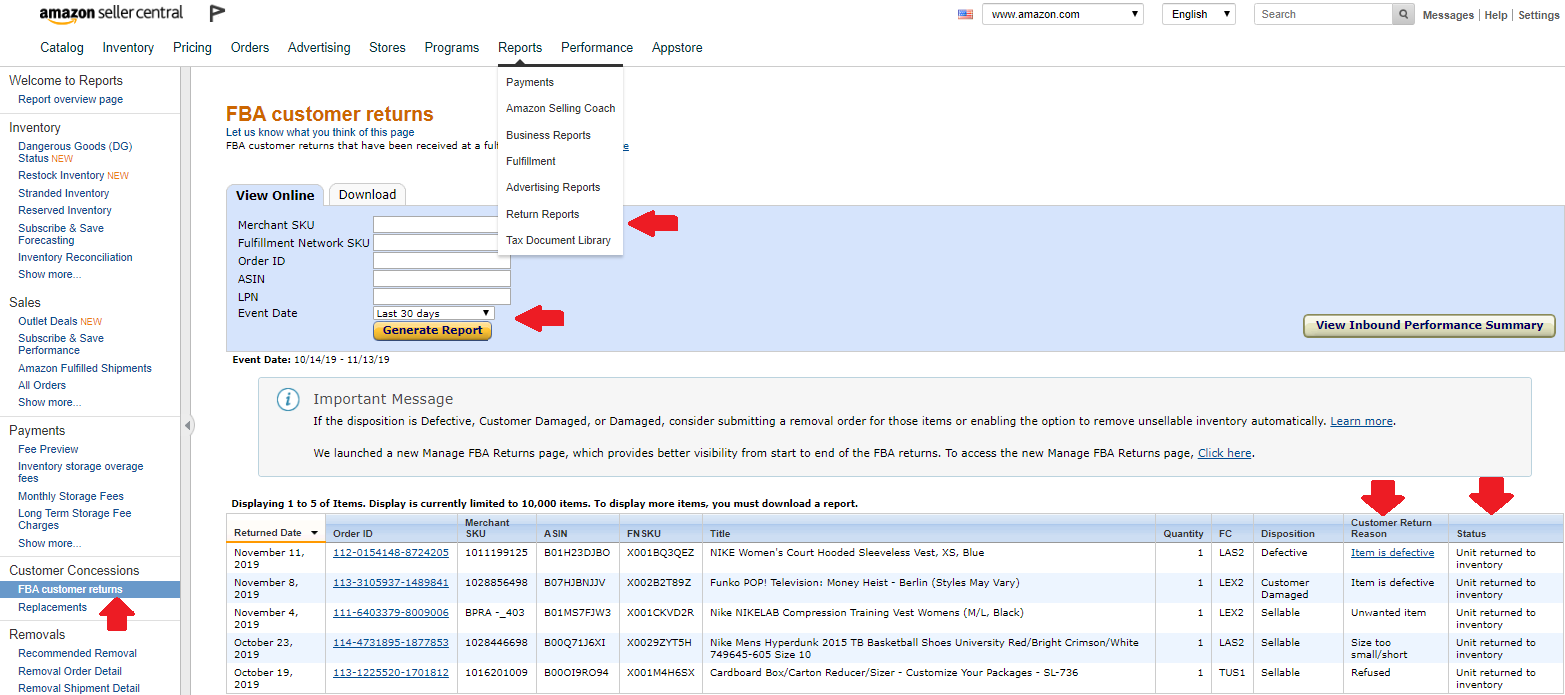
- Click Reports in the top menu, then select Fulfillment.
- Under Customer Concessions in the left-hand menu, click FBA Customer Returns.
- Select a date range — 30 days is a fine starting point, though your first review may need to reach back further.
- Click Generate Report, then download it as a CSV if you want to sort, filter, or reconcile it against your own spreadsheet.
The newer FBA Returns dashboard: go to Inventory → FBA dashboard, then open the Inventory tab and select FBA Returns. This gives you the Return Insights dashboard (return-reason trends over time) and the Return Orders dashboard, both built for spotting patterns rather than just pulling raw rows.
Use the classic report when you need exportable, disposition-level data for bookkeeping or removal decisions. Use the FBA Returns dashboard when you want to understand why a SKU keeps coming back, not just that it did.
Reading the Disposition Column
The report’s most important column is Disposition — it tells you exactly what condition Amazon assigned the returned unit, and that assignment determines whether you owe yourself a decision or Amazon owes you money.
| Disposition | What It Means | Your Move |
|---|---|---|
| SELLABLE | Returned to stock and available for purchase again. | Nothing needed. |
| DAMAGED | Amazon takes responsibility; ownership transfers to Amazon. | Compensated under the FBA inventory reimbursement policy, typically without filing a claim. |
| CARRIER DAMAGED | Amazon takes responsibility for carrier-caused damage; ownership transfers. | Same reimbursement path as Damaged. |
| CUSTOMER DAMAGED | Customer is refunded; unit stays in your inventory as unsellable. | Choose one of the four recovery paths below. |
| DEFECTIVE | Customer is refunded; unit is unsellable, either visibly damaged or reported faulty. | Same decision as Customer Damaged. |
| EXPIRED | Unit is near or at its expiration date and may be set aside for disposal. | Act quickly — once Amazon disposes of it, it can’t be returned to you. |
Four Paths for Unsellable Inventory — and What Each One Actually Costs
Every unit that lands in Customer Damaged, Defective, or Expired status forces the same choice: return it to yourself, dispose of it, liquidate it, or route it into Amazon’s Grade and Resell program. Your Automated Unfulfillable Settings make this decision for you by default unless you go in and set it deliberately — and the setting you should pick depends on the real cost of each path, not habit.
Removal Order — Return to You
Amazon ships the unit to your designated return-to address for a per-unit fee based on shipping weight. As of March 1, 2026, this fee is charged when the individual unit ships, not as one lump sum when the whole order finishes.
| Size Tier | Shipping Weight | Fee Per Unit |
|---|---|---|
| Standard-size | 0 to 0.5 lb | $0.84 |
| Standard-size | 0.5+ to 1.0 lb | $1.53 |
| Standard-size | 1.0+ to 2.0 lb | $2.27 |
| Standard-size | More than 2 lb | $2.89 + $1.06/lb above 2 lb |
| Large bulky, extra-large, special handling | 0 to 1.0 lb | $3.12 |
| Large bulky, extra-large, special handling | 1.0+ to 2.0 lb | $4.30 |
| Large bulky, extra-large, special handling | 2.0+ to 4.0 lb | $6.36 |
| Large bulky, extra-large, special handling | 4.0+ to 10.0 lb | $10.04 |
| Large bulky, extra-large, special handling | More than 10.0 lb | $14.32 + $1.06/lb above 10 lb |
Ship to a Prep Center for Inspection and Reshipment
Instead of routing a removal order to your own address, you can send it to a 3PL or prep center. Many prep centers will inspect the unit, separate what’s genuinely sellable from what isn’t, and either prep it for resale or reship it back into FBA — see our Amazon FBA prep services directory if you need one that handles returns.
The catch is that the costs stack rather than replace each other: you still pay Amazon’s removal fee from the table above to get the unit out of the fulfillment center, plus the prep center’s own per-unit receiving and inspection fee on top. Depending on the provider and item, that combined cost often lands well above $2.50–$4.00 per unit before you’ve recovered a single dollar — and the item still needs to sell somewhere. This path earns its cost mainly on higher-value or brand-sensitive SKUs where a hands-on look is worth paying for.
FBA Liquidations
Liquidation skips the removal fee entirely. Amazon sells the unit in bulk to a contracted liquidation partner for roughly 5% to 10% of its average selling price — that’s the gross recovery value. From that gross amount, Amazon deducts a 15% liquidations referral fee plus a small per-unit liquidation processing fee, ranging from $0.25 for a light standard-size item up to $1.90 or more for a large bulky item over 10 lb.
Net result: liquidation is fast and completely hands-off, but the actual dollars you recover are usually a modest single-digit percentage of what the item originally sold for.
FBA Grade and Resell
Grade and Resell relists eligible unsellable-as-new returns as Used instead of removing them. If Amazon grades a unit Unsellable, you pay nothing. If it grades Used — Like New, Very Good, Good, or Acceptable — a flat per-unit processing fee applies only at the moment it’s relisted: $1.50 for small standard-size items (16 oz or less), $1.80 for large standard-size items (21 lb or less), $2.65 for small/medium oversize, or $4.10 for large/special oversize.
In Amazon’s own published example — a $30 home goods item weighing 3.35 lb — net recovery after the processing fee, fulfillment fee, and referral fee ranged from $10.57 (Acceptable grade, 35.23% of original price) up to $15.67 (Like New grade, 52.23%). Compare that to simply disposing of the same item, which is a straight loss of $2.36 in fees with zero recovery.
The limits: items priced under $10, hazmat, expiration-dated, recalled, and several other categories are excluded, and grading can take up to three weeks — longer during peak season.
| Path | Cost | Typical Net Recovery | Best For |
|---|---|---|---|
| Removal (to you) | $0.84–$14.32/unit fee only | Depends entirely on what you do next | SKUs you’ll personally resell or repurpose |
| Prep center reship | Removal fee + prep center’s own inspection fee, stacked | Depends on eventual resale | High-value or brand-sensitive SKUs worth manual inspection |
| Liquidation | 15% referral fee + small processing fee, no removal fee | Roughly a few percent of original price | Low-value, high-volume unsellable stock, zero effort |
| Grade and Resell | $1.50–$4.10/unit only if relisted; $0 if graded Unsellable | ~35–52%+ of original price in Amazon’s own example | Eligible items priced $10–$75, most categories |
Filing a Reimbursement Claim for Damaged Returns
When a unit comes back Damaged or Carrier Damaged, Amazon has already taken ownership and typically compensates you automatically under the FBA inventory reimbursement policy. If you believe a unit was mishandled and wasn’t compensated, or you want to file a claim directly, Amazon requires that all of the following are true for the item to be eligible:
- The item was registered in FBA at the time it was lost or damaged.
- The item complies with FBA product restrictions and inventory requirements.
- You sent the exact items and quantities stated in your shipping plan.
- The shipment isn’t in canceled or deleted status.
- The item isn’t pending disposal, and wasn’t disposed of at your request.
- The item isn’t defective and wasn’t damaged by a customer.
- Your selling account is in normal status when you file, and throughout any review or appeal.
Before you dispose of anything, photograph the item, its packaging, and the shipping label, and keep the physical box and packing slip. The exact claim process depends on where in the fulfillment chain the damage occurred — shipment to Amazon, fulfillment center operations, customer returns, or removals each follow a slightly different path, and Amazon can decline a claim that skips required documentation.
The Billing Change Every Seller Should Know for 2026
Amazon originally announced this change would take effect February 15, 2026, then revised the effective date to March 1, 2026. Either way, the mechanics are the same: removal and disposal fees are now charged per unit at the moment each unit is actually removed or disposed of, rather than as one consolidated charge when the entire order completes. The fee rates themselves haven’t changed — only the timing has.
You can track these charges under Payments → Transaction View, filtered to Service Fees, and cross-reference progress against the Removal Order Detail Report.
A Practical Monthly Workflow
FBA Customer Returns report overview ·
FBA Returns page ·
FBA Grade and Resell ·
Value-recovery services (Liquidations) ·
2026 FBA removal, disposal, and liquidation fee changes ·
FBA removal/disposal per-unit billing announcement ·
FBA inventory reimbursement policy
Stay Up-to-Date: Sign Up Today for Updates!
Subscribe to Essential Updates for more resources, tips, and strategies to help grow your Amazon Business.