

FBA Prep Services · November 2026
Amazon Prep Center Seller Central Access: What Manage Services Grants
Prep centers connect through Manage Services. Check the authorization screen and ask the prep center five questions before you approve.
When you hire a prep center, it needs some access to your Seller Central account to work on your shipments. Amazon treats a prep center as an outside business, so the access goes through Manage Services, not through an employee invite. You choose what to allow and which account and countries it applies to. The access ends on a date shown on the screen. The steps below follow that screen. If you are still choosing a prep center, start with our Amazon FBA prep services directory.
Key Takeaways
- A prep center is an outside business, so you authorize it as a service provider in Manage Services instead of inviting it as an employee.
- You must be the account owner or an administrator, and the prep center must be registered in Amazon’s Solution Provider Portal with approved roles.
- You choose the permissions and can limit the countries. The access lasts 365 days.
- You can view or remove access from Manage Services at any time, and you can reauthorize before it expires.
Prep Centers Connect Through Manage Services
Amazon’s help page defines a service provider as any third party outside your organization that you grant access to your Seller Central account. A prep center fits that description. An employee is someone inside your organization, and employees are managed in Manage Employees instead of Manage Services.
Two things have to be true before you can authorize a prep center. You must be the account owner or an account administrator. The prep center must also be registered in Amazon’s Solution Provider Portal and have approved roles.
How to Authorize a Prep Center, Step by Step
There are two ways to start. The prep center can send you its authorization link, or you can open its listing in the Service Provider Network and choose Authorize Now. If the prep center is listed in the network, Amazon creates a service request when you confirm, and the prep center must accept it before the authorization becomes active.
- Open the authorization link or choose Authorize Now.
- Review the permissions on the screen. Each one starts at None.
- Use the country and region dropdown if you want to limit where the access applies.
- Tick the confirmation box. It says you direct Amazon to give the provider access to your account and related data, and that you are responsible for any actions the provider takes.
- Choose Authorize.
The screen also shows an expiration date, and access lasts 365 days.

Prep Center Permissions: What the Screen Shows
The permissions you see depend on the roles the prep center is approved for. Amazon says only the roles a provider has been approved for appear on the authorization page.
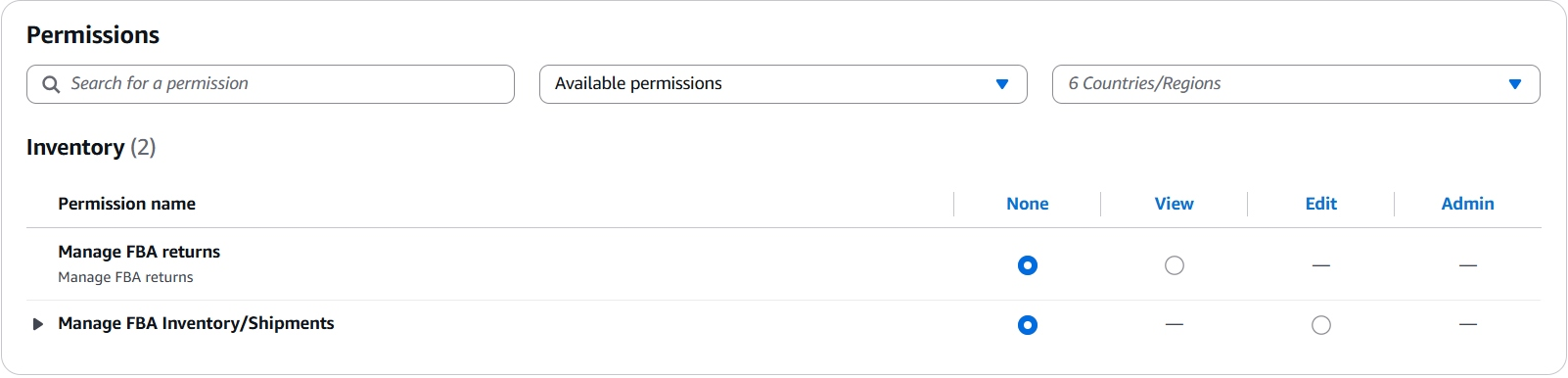
On the screens we checked, one prep center showed two permissions under Inventory:
- Manage FBA returns: None or View.
- Manage FBA Inventory/Shipments: None or Edit.
The other prep centers we checked showed only Manage FBA Inventory/Shipments. Each permission offers only the levels that apply, so Manage FBA Inventory/Shipments has no View setting and Manage FBA returns has no Edit setting. If returns is missing for your prep center, it may not be approved for that role, or it may not offer that service.
The arrow beside Manage FBA Inventory/Shipments opens a list of your own selling accounts and the countries you are authorized to sell in. Use it to match the access to the account and marketplace the prep center will work on.
Prep Center Shipping Costs: Whose Account Pays
In most cases, the prep center buys shipping from inside your seller account through Amazon’s Partnered Carrier program, and the charge is billed to your account. Amazon says the program offers discounted rates for sending shipments to FBA fulfillment centers. Larger prep centers may have negotiated rates that are better still, so ask what they can offer and compare it with the partnered rate.
Questions to Ask Before You Authorize a Prep Center
- Which Seller Central roles are you approved for?
- Do you offer returns handling?
- Do you buy shipping through my account, or on your own rates?
- What happens if Amazon rejects or delays a shipment because of a prep error?
- Who on your team will be working in my account?
Our guide to choosing an Amazon FBA prep center lists six things to compare before you commit.
If Your Prep Center Sends Different Instructions
Some prep centers publish setup guides that ask you to invite them as a user and set permissions such as Manage FBA Inventory/Shipments. That is the employee route, which Amazon’s help page describes as access for people inside your organization. The steps and screen names in those guides may not match what you see in Manage Services. If a prep center sends you one, ask whether it also offers the Manage Services authorization.
Reauthorize or Remove Prep Center Access
You can view or remove a provider’s access at any time from the Manage Services page. Before the 365 days end, you can reauthorize to avoid an interruption. If the authorization expires, the provider can no longer act on your account, and you must complete the full authorization process again. Amazon says removal cannot be undone, so restoring access means authorizing the provider again.
Put the expiry date on your calendar, and review who has access whenever you change prep centers.
Frequently Asked Questions About Prep Center Seller Central Access
How do I give a prep center access to my Amazon Seller Central account?
Authorize it through Manage Services. Amazon describes an outside business as a service provider, and you start with the authorization link the prep center sends you or with Authorize Now on its Service Provider Network listing.
Should I add a prep center as an employee or a service provider in Seller Central?
A prep center is an outside business, and Amazon’s help page says anyone outside your organization uses Service Provider access, which you manage in Manage Services. An employee is someone inside your organization.
Why doesn’t my prep center’s Seller Central authorization show FBA returns?
The permissions shown are the roles that prep center is approved for. Ask the prep center whether it offers returns handling.
Can I limit a prep center’s Seller Central access to one account or marketplace?
Yes. The authorization screen has a country and region filter, and the arrow beside Manage FBA Inventory/Shipments lets you choose which of your selling accounts the access applies to.
How long does a prep center’s Seller Central authorization last?
It lasts 365 days. The expiration date appears on the authorization screen, and you can reauthorize before it ends.
How do I remove a prep center’s access to my Amazon Seller Central account?
Open Manage Services and remove the provider at any time. Removal cannot be undone, so you would need to authorize the provider again to restore access.
FBA Prep Services Directory
Find and compare Amazon FBA prep centers
Authorizing a prep center is the step that comes after you choose one. The Seller Essentials directory lists prep centers by model and location, including online arbitrage, wholesale, import and tax-free options, so you can compare providers before you give anyone access.

Advertisement
